Save 30–70%: Refurbished vs New Electronics, Warranty Checklist + AI
For most budget-conscious shoppers, certified refurbished electronics deliver the same everyday performance as new models for 30 to 70% less, and that gap holds across phones, laptops, and headphones. The catch isn’t the hardware. It’s the paperwork: a device without a real warranty or a reasonable return window that turns a good deal into a gamble. Buy from a source that offers both, and the checklist below tells you exactly what to check before you pay.
TL;DR:
- Manufacturer or certified refurbishers typically provide longer warranties and use original parts, reducing the risk of failure compared to independent sellers.
- Many refurbished devices sell for 30 to 70% less than new, especially discontinued models or older flagship phones and laptops.
- A genuine warranty of at least 90 days to one year, along with a clear return window, is essential to protect against post-purchase issues.
- Cosmetic wear and battery health vary, so buyers should confirm specific conditions and ask whether batteries or internals were replaced.
- Refurbished electronics make a significant environmental impact by extending device lifespan and reducing e-waste, especially when bought from reputable sources.
Table of Contents
- Refurbished vs New Electronics: Weighing the Real Tradeoffs
- What Does “Refurbished” Actually Mean?
- Warranty and Return Policies: What to Demand
- Who Refurbished the Device, and Why It Changes the Risk
- When Refurbished Makes Sense (and When It Doesn’t)
- How to Buy Refurbished Electronics Safely
- The Environmental Case for Buying Refurbished
- Red Flags That Signal a Bad Refurbished Deal
- Finding Verified Refurbished Deals Without the Guesswork
- Why Certified Refurbished Earns Our Recommendation
- A Faster Way to Compare Refurbished Prices
- Sources
Refurbished vs New Electronics: Weighing the Real Tradeoffs
The savings on refurbished electronics aren’t a rumor. Depending on how old the model is and what grade it carries, refurbished devices commonly sell for 30 to 70% less than new, with the deepest discounts showing up on flagship phones and laptops that are a generation or two behind current models. A refurbished iPhone from two cycles back might cost half what the current model runs, while a refurbished MacBook Pro can save you several hundred dollars over a brand-new unit with nearly identical specs.
Where refurbished actually pulls ahead of new isn’t just price. Buying refurbished gives you access to discontinued models that manufacturers no longer sell new. If a laptop line got replaced by a slimmer, more locked-down version, the refurbished market is often the only place left to find the older, more repairable design. Some refurbished units also come with upgraded internals from their original owner, like added RAM or a swapped SSD, that you’d pay extra for on a new unit.
The tradeoffs are real, too. Refurbished electronics typically show some cosmetic wear, from light scratches on a laptop lid to a slightly scuffed phone frame. Battery life is the bigger question mark. A refurbished phone or laptop battery may have been replaced during the refurbishing process, or it may not have, and that detail changes how long the device lasts between charges for the next year or two.
Here’s the quick tally:
- Price: Save 30 to 70% versus buying new, depending on model age and condition grade.
- Availability: Access to discontinued or older models no longer sold new.
- Cosmetics: Expect minor scuffs or wear marks even on “like-new” grades.
- Battery: Health varies unless the listing explicitly states a battery replacement.
- Environmental impact: Extending a device’s life keeps it out of the waste stream longer.
None of this makes refurbished automatically better or worse than new. It makes it a different bet, one where the seller’s transparency matters as much as the price tag.
What Does “Refurbished” Actually Mean?
“Refurbished” isn’t a single standard. It’s an umbrella term covering several different processes, and the differences between them determine how much risk you’re taking on.
Manufacturer refurbished devices are returned to the original company (Apple, Samsung, Dell) for inspection, repair, and retesting using factory parts. Certified marketplace refurbished items go through a third-party program with its own testing checklist, backed by platform-level guarantees, think Amazon Renewed or Back Market. Seller-refurbished covers independent retailers who repair and resell devices under their own standards, which vary wildly in rigor. Open-box items are typically unused returns with damaged packaging, not actually repaired at all, which puts them closer to new than refurbished in practice.
Grading labels add another layer. “Grade A” or “like-new” usually means minimal to no visible wear and full function. “Grade B” allows light scratches or scuffs. “Grade C” signals more noticeable cosmetic damage but working hardware. Since there’s no legally binding definition of “refurbished,” these grades are set by the seller or platform, not a regulator, so consistency depends on who’s grading.
Before you buy, run through this:
- Confirm who refurbished it: manufacturer, certified program, or independent seller.
- Read the grade definition on that specific listing, not a general glossary.
- Check whether the battery, shell, or accessories were replaced or original.
- Look for a stated warranty length tied to the grade.
Warranty and Return Policies: What to Demand
Warranty length is the single biggest predictor of whether a refurbished purchase turns out well. Manufacturer refurb programs commonly include a one-year warranty that mirrors coverage on new devices. Certified marketplaces tend to land shorter, often 90 days, though some premium tiers stretch to a year. Independent sellers are the wild card. Coverage there can range from 30 days to nothing at all.
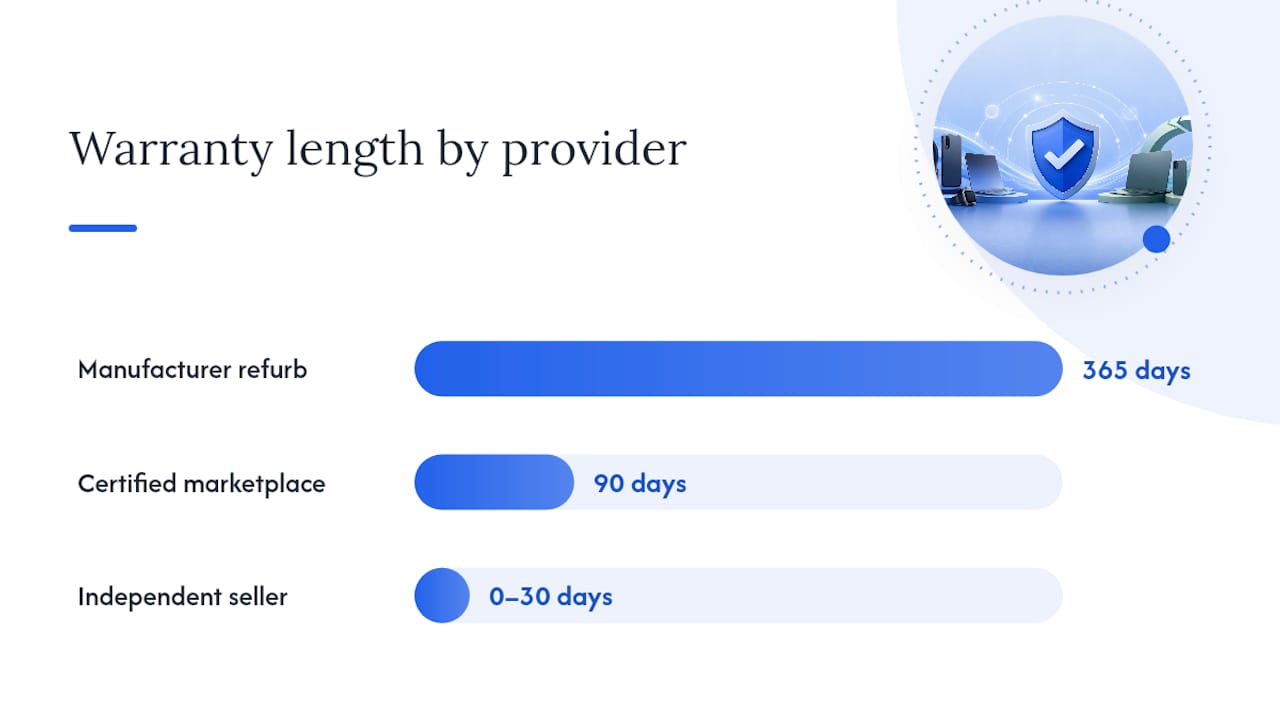
Why does the provider matter as much as the length? A manufacturer warranty means repairs go through official channels with original parts. A marketplace warranty usually means a replacement or refund through the platform, not a repair, which is faster but doesn’t fix the unit you actually own. An independent seller’s “warranty” might just mean they’ll take your call.
Consumer advocates generally recommend treating 90 days as a minimum and one year as the target for any refurbished purchase over $100.
Before buying, confirm:
- The exact warranty length and who honors it (manufacturer, marketplace, or seller).
- Whether the return window is separate from the warranty period.
- If a restocking fee applies to returns.
- Whether you need to inspect and report issues within a specific number of days.
Skip this step and you’re trusting a stranger’s description of a used product with no recourse if it’s wrong.
Who Refurbished the Device, and Why It Changes the Risk
The identity of the refurbisher tells you more about quality than the price does. Manufacturer refurbishment programs use original parts and standardized testing protocols, and failure rates tend to run lower than with anonymous seller-refurbished stock, since the company has both the parts inventory and the incentive to protect its brand.
Certified refurbishers and major marketplaces sit in the middle. They typically run multipoint inspections (checking battery health, screen function, ports, and cosmetic condition) and back the sale with a platform warranty even when the actual repair work was outsourced.
Independent sellers require more homework on your end. Before buying from one, ask directly:
- Which parts were replaced, and were they original or aftermarket?
- What’s the current battery health percentage?
- Do they have lab test records or a documented inspection report?
- What happens if the device fails in week two?
A seller who can’t answer these clearly is telling you something, even if they don’t say it outright.
When Refurbished Makes Sense (and When It Doesn’t)
Device category changes the math. Phones, laptops, and headphones tend to be safe refurbished bets because their core function doesn’t degrade unpredictably, and battery replacement is straightforward to verify. Discontinued models are almost always worth buying refurbished since there’s no new alternative to compare against anyway.
Some categories deserve more caution. TVs are harder to inspect for panel defects from photos alone, and shipping damage to large displays is common. Wear-sensitive peripherals, like gaming mice or keyboards, show usage in ways that aren’t always disclosed. Hygiene-sensitive items, earbuds, razors, anything that touches skin, are worth buying new unless the seller explicitly states full sanitization and part replacement.
A simple threshold works for most purchases: if the discount is at least 20 to 40% off the new price and the warranty runs 90 days or longer, it’s worth serious consideration. Below that discount, or without a real warranty, buying new usually makes more sense.
- Buy refurbished confidently: phones, laptops, tablets, headphones, discontinued models.
- Buy refurbished cautiously: TVs, gaming peripherals, smart home hubs.
- Lean toward new: earbuds, personal care electronics, anything without a stated sanitization process.
How to Buy Refurbished Electronics Safely
Buying refurbished rewards patience. Rushing the process is how people end up with a locked phone or a battery that dies in six months.
- Verify the refurbisher. Confirm whether it’s the manufacturer, a certified program, or an independent seller, and match that against the warranty being offered.
- Read the full grading description, not just the grade letter, on that specific listing.
- Check the warranty length and provider, and confirm the return window separately.
- Compare price history against similar listings to spot something priced too low to be real.
- On arrival, inspect the exterior for damage that wasn’t disclosed in photos.
- Run functional tests: cameras, speakers, ports, buttons, and the screen for dead pixels.
- Check the serial number, IMEI, or activation lock status to confirm the device isn’t reported lost or stolen.
- Test battery health using built-in diagnostics where available.
- Register the warranty immediately and keep the original packaging and receipt.
- Escalate fast if something’s wrong. Most protections only apply within a defined window.
This sequence lines up closely with the core checks recommended by consumer tech reporters covering refurbished purchases, and it holds regardless of device type.
Pro Tip: Pay with a credit card whenever possible, not a debit card or bank transfer. If a refurbished seller ghosts you after a bad sale, a credit card chargeback is often your fastest path to getting your money back.
The Environmental Case for Buying Refurbished
Every refurbished device you buy is one fewer new unit pulled from raw materials. Global e-waste has surpassed 62 million metric tons, and manufacturing a single new smartphone produces roughly 85 kilograms of CO2 while consuming over 12,000 gallons of water. Extending a device’s usable life through refurbishment sidesteps a meaningful share of that production footprint entirely.
The math compounds the longer a device stays in circulation. A refurbished laptop that gets three more years of use didn’t require new mining, new assembly, or new shipping to reach you. It also delayed its own arrival in a landfill or recycling stream by that same stretch.
For budget shoppers, this isn’t a separate motivation from saving money. It’s the same decision wearing two hats. Buying refurbished slows your personal upgrade cycle, which saves cash today and reduces the resource draw of replacing devices more often than necessary.
Red Flags That Signal a Bad Refurbished Deal
Some listings announce trouble before you even click buy. A missing warranty section, vague or absent grading language, and stock photos instead of real images of the actual unit are all signs to walk away. A price that’s dramatically lower than every comparable listing for the same model and grade usually means something’s wrong with the device, not that you found a secret deal.
Technical risks run deeper than cosmetics. Blacklisted or carrier-locked phones, batteries swapped with uncertified third-party parts, and devices running outdated firmware that can’t be updated are common problems with poorly vetted refurbished sellers.
If something goes wrong after purchase:
- Keep every message, photo, and receipt tied to the sale.
- Use a credit card chargeback if the seller won’t resolve the issue directly.
- Contact the marketplace’s buyer protection program before the dispute window closes.
- For peer-to-peer sales, an escrow-style transaction service can hold payment until you confirm the item matches the listing.
Finding Verified Refurbished Deals Without the Guesswork
Spotting a legitimate refurbished deal usually means comparing the same model across several sellers, checking price history, and figuring out whether a seller is reliable before you commit. That’s tedious to do manually across a dozen open tabs.
An AI-powered price comparison tool speeds up exactly that process. It pulls listings from verified retailers, flags pricing that looks inflated through dropship markups, and surfaces seller reliability signals alongside the price itself. For refurbished shopping specifically, that means spotting when a “certified refurbished” listing is priced suspiciously close to new, or when a seller’s price sits far outside the normal range for that grade and model.
None of that replaces reading the warranty terms yourself. It just narrows the field faster, so you spend your inspection time on listings worth inspecting.
Why Certified Refurbished Earns Our Recommendation
The pragmatic case for refurbished electronics isn’t about ideology. It’s about matching protections to price. When a listing offers a real warranty from a manufacturer or certified program, a return window long enough to actually test the device, and clear grading language, refurbished stops being a compromise and starts being a smart trade.
We call a refurbished deal “recommended” when the seller is transparent about who did the refurbishing and what condition to expect, and when the warranty is long enough to catch early failures. Anything less than that, and the discount stops mattering.
Test the device the day it arrives. Run the diagnostics, check the battery, use the return window if something feels off. The protections only work if you actually use them.
— Timothy
A Faster Way to Compare Refurbished Prices
A price comparison tool is built for exactly the moment you’re standing between a refurbished listing and a new one, trying to figure out which price actually makes sense. Instead of opening ten browser tabs to compare a refurbished iPhone across three marketplaces, price comparisons from verified US retailers and factory-direct sources can be seen side by side, with reliability signals that flag when a “deal” is really just a dropship markup in disguise.

Price tracking and alerts mean you don’t have to babysit a listing waiting for it to drop into your target range, and the visual search feature lets you snap a photo of a device you found elsewhere and instantly check whether you’re actually getting the best price. Some users have saved substantial amounts by catching these price gaps before checking out.
If you’re deciding between a refurbished laptop and a new one, start by comparing prices across retailers before you commit, or head straight to Aipricesearch to run your next search.
Sources
For deeper detail on warranties and certified sellers, see Consumer Reports’ refurbished electronics guide and Wired’s shopping checklist. For environmental context on device lifespan, the UN’s e-waste data lays out the manufacturing impact refurbished purchases help offset. AARP’s consumer guide covers savings expectations in plain terms.
Recommended
- 225 Product Searches Analyzed Amazon Leads As Cheapest Retailer In 51 Of Cases
- Amazon Vs Walmart Price Leadership Across 182 Weekly Searches
- August Price Tracker Amazon Leads In Value Across 153 Shopper Queries
- Retailer Price Wars Aliexpress And Amazon Split The Lead In 184 Consumer Searches
Want to compare offers instantly? Search any product on AI Price Search.
Search a price →