US Shoppers: Check Sellers and Landed Cost to Outsmart Dynamic Pricing Online

Online prices change constantly, sometimes multiple times a day, based on demand, inventory, and even who’s browsing. The fix isn’t complicated: track price history, set alerts with real thresholds, and always compare the total landed cost across sellers before you buy. Do that consistently and you catch the dips instead of guessing at them. Shoppers using AI Price Search have reported average savings of $212 this month simply by comparing verified retailers before checkout.
TL;DR:
- Tracking price history helps confirm whether a current low price is actually a deal or just a temporary dip.
- Using real thresholds and grouping alerts by item category prevents alert fatigue and saves time.
- Always include shipping and tax estimates to accurately compare total landed costs across sellers.
- Consumer tools may misread bundles or regional variants, so verify prices directly before purchasing.
- AI Price Search combines live price tracking, seller reliability checks, and image search, saving an average of $212 per month for users.
Table of Contents
- What Tools Actually Track Changing Online Prices
- How to Set Price Alerts That Don’t Waste Your Time
- Comparing the Real Cost, Not Just the Sticker Price
- When to Wait for a Sale and When to Just Buy
- Where Price Alerts and Trackers Can Mislead You
- The Pricing Tactics Retailers Use Behind the Scenes
- Is Dynamic Pricing Fair to Shoppers?
- How Price Swings Change the Way You Shop
- How to Spot Dynamic Pricing While You’re Shopping
- What Dynamic Pricing Actually Costs You as a Shopper
- Author Perspective: One Alert, One Real Save
- Let AI Price Search Do the Watching for You
- Sources
What Tools Actually Track Changing Online Prices
Not every price tool does the same job, and picking the wrong one wastes time. Browser extensions like Honey and Capital One Shopping sit quietly in your browser and auto-apply coupon codes at checkout, plus flag when a competitor has the same item cheaper. They’re great for passive savings on mainstream retail but weak on price history.
Dedicated trackers such as CamelCamelCamel solve that gap for Amazon shoppers by charting months of price movement, so you know whether $79.99 is actually a deal or the item’s normal price wearing a red “sale” banner. Combining coupon apps with comparison tools saves both money and time, according to NerdWallet, especially when paired with retailer newsletters for early access to markdowns.
Aggregator searches take a different approach entirely: instead of watching one item over time, they pull live prices from multiple retailers onto a single page. This is where a tool like AI Price Search earns its keep, since it factors in seller reliability alongside price. For in-store price checks, mobile scan and image search let you snap a photo of a product and instantly see if it’s cheaper online.
The trade-off across all of these: extensions and trackers see your browsing activity to function. Reputable ones disclose what they collect; sketchy ones sell it. Stick to tools with clear privacy policies and app-store reviews before installing anything that touches your checkout flow.
- Browser extensions: passive, auto-apply coupons, best for everyday retail
- Price-history trackers: show if today’s price is actually low
- Aggregator searches: one page, multiple retailers, includes seller signals
- Image/scan search: compares in-store finds against online prices instantly
Pro Tip: Install no more than two or three price tools. Running five extensions at once slows your browser and makes it harder to tell which alert actually matters.
How to Set Price Alerts That Don’t Waste Your Time
Most people set an alert for “any price drop” and then ignore the twelve notifications a week later because none of them mattered. The fix is building rules, not just watching a number.
- Pick your threshold type. For a $1,200 laptop, an absolute target (“alert me at $999”) works better than a percentage, since a 5% drop on big-ticket items is real money. For a $15 kitchen gadget, a percentage drop (15% or more) filters out noise better than a fixed dollar amount.
- Match cadence to category speed. Electronics and flash-sale categories move fast, so checking every few hours makes sense. Furniture and home goods barely move day to day, so a daily or every-other-day check is plenty. Grouping items by how often their prices actually change keeps you from either missing drops or drowning in alerts, according to WebScrapingHQ’s monitoring research.
- Suppress the noise. Instead of an alert for every $2 fluctuation, set a rule that bundles the week’s significant drops into one summary. This single change eliminates most alert fatigue.
- Include shipping in the threshold. A $49.99 item that jumps to $56 with shipping isn’t actually cheaper than the $52.99 competitor with free shipping. Build that math into the alert itself.
A real example: set a $999 hard alert on that laptop, a 20% drop alert on a $200 pair of headphones, and a weekly digest (not real time) for a couch you’re not in a rush to buy.
Pro Tip: Pair every alert with a quick glance at the item’s price history first. A price that looks low today but sits above last month’s average isn’t really a deal, it’s a rebound.
Comparing the Real Cost, Not Just the Sticker Price
The lowest listed price is frequently not the lowest amount you’ll actually pay. Shipping fees, estimated tax, and processing charges can turn a $45 “deal” into a $58 dead end once you reach checkout. Run the full total, every single time, before assuming you found the winner.
Seller identity matters just as much as the number. A marketplace listing at the bottom of the page might come from a dropshipper with three-week shipping times and no real return policy, while the seller charging $4 more ships from a US warehouse with a 30-day return window. Marketplace offers vary by seller reputation and shipping terms, and ignoring that context is how shoppers end up with the “cheap” option that costs them a month of waiting.
- Add shipping and estimated tax before comparing any two prices
- Check the seller’s review count and rating, not just the store name
- Confirm return and warranty terms before clicking buy
- Watch for vague shipping windows (“2 to 6 weeks”) as a dropship red flag
A tool that flags dropship markups automatically, like AI Price Search’s detection feature, removes most of this guesswork before you ever add something to your cart.
When to Wait for a Sale and When to Just Buy
Timing is where most shoppers either save the most money or lose the item entirely. End-of-season clearances, Black Friday, Labor Day sales, and post-holiday markdowns are the four windows where prices reliably drop hardest across categories. Retailers plan seasonal discount cycles well in advance, which is why the same item often reappears at a lower price within a predictable window rather than randomly.
Price history is your best evidence for whether patience pays off. If a jacket has dropped to the same price for the last three Novembers, betting on a repeat is reasonable. If it’s never dropped below its current price in a year of tracking, waiting might just mean paying full price later out of frustration.
- Watch for stock warnings (“only 2 left”) on limited runs or older models before they get discontinued
- Don’t wait on seasonal or exclusive colorways that won’t restock
- Use price history, not gut feeling, to judge if a “sale” price is genuinely new
Waiting has a real cost too. Limited inventory items and version changeovers (last year’s phone model, a discontinued shade) can vanish entirely if you hold out for a deal that never comes.
Where Price Alerts and Trackers Can Mislead You
Trackers and extensions aren’t perfect, and knowing where they fail keeps you from getting burned. Parsing errors are common: a tool reads a bundle price, a refurbished listing, or a regional variant as the “same” product and fires an alert that doesn’t hold up once you click through.
Privacy is the other trade-off. Extensions that auto-apply coupons typically see your browsing history and shopping cart contents to function, which is a reasonable exchange for convenience as long as the provider states clearly what it collects. Before you trust any “price drop” notification, run this quick checklist:
- Refresh the retailer’s page directly to confirm the price is current
- Recalculate the total with shipping and tax included
- Check that the seller is who you think it is
- Read the return policy in case the item doesn’t match expectations
- Confirm any coupon code actually applies at checkout
Pro Tip: Treat “limited time” banners with suspicion. Many countdown timers reset the next day, and the “urgency” is often just a layout choice, not a real deadline.
The Pricing Tactics Retailers Use Behind the Scenes
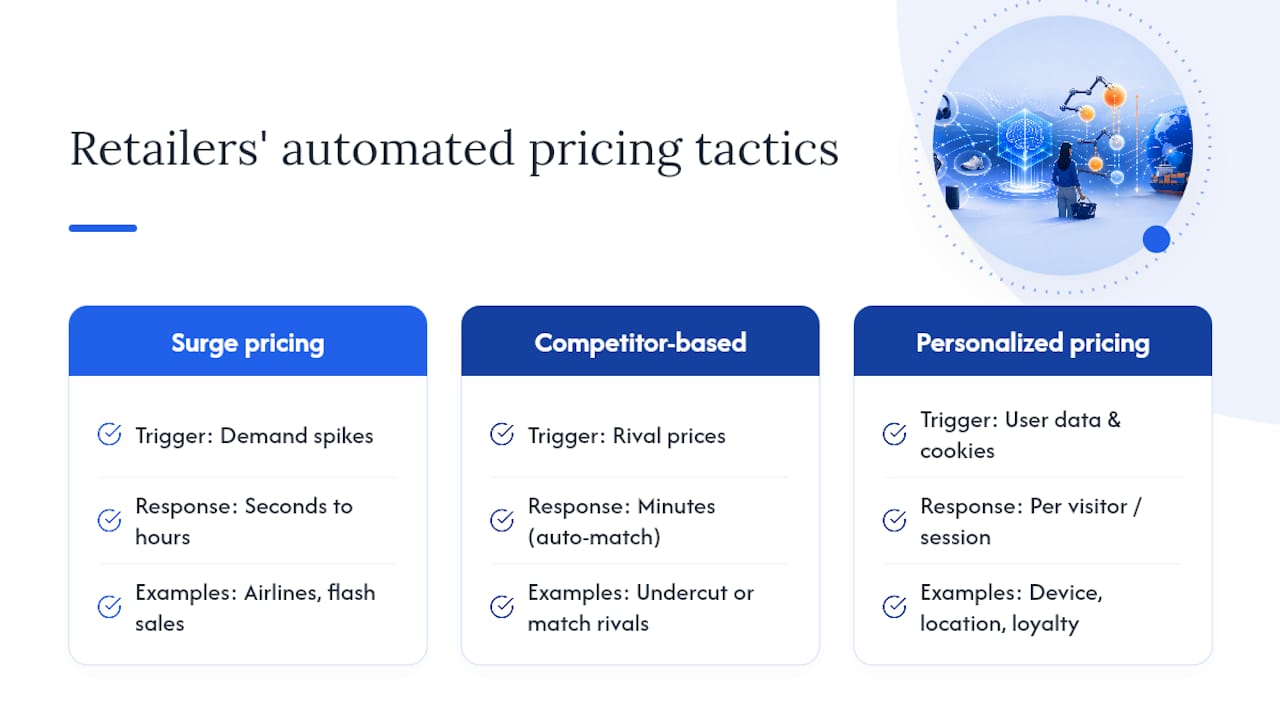
Prices online rarely move by accident. Retailers run automated systems that adjust prices based on demand, competitor moves, and even who’s shopping, and understanding the basic categories helps explain why the same item can cost different amounts an hour apart.
Surge pricing raises prices when demand spikes, the same logic ride-share apps use during a storm. Airlines and event ticket sites lean on this heavily, but retail applies it too during flash sales or when a product suddenly goes viral.
Competitor-based pricing happens when a retailer’s system scans rival sites and automatically matches or undercuts them within minutes. This is part of why the same product can show three different prices across three stores on the same afternoon, each one reacting to the others in near real time.
Personalized pricing is the most debated form. It uses browsing history, device type, location, and even past purchases to show different shoppers different prices for the identical item. Evidence for how widespread this is stays mixed and hard to verify from the outside, but the mechanics are well documented: loyalty status, browser cookies, and even whether you’re on a phone or laptop can all factor into what price loads on the page.
None of these tactics are visible to the shopper by default. That’s precisely why price-tracking tools exist. If the retailer’s system is adjusting in real time, your comparison tool needs to be checking in real time too.
Is Dynamic Pricing Fair to Shoppers?
Retailers argue that dynamic pricing keeps them competitive and reflects real supply and demand, similar to how gas prices shift with crude oil costs. Shoppers often see it differently, especially when personalized pricing means two people pay different amounts for the same product with no visible explanation.
The core ethical tension is transparency. Surge pricing during a storm or a sold-out event is at least visible, everyone sees the higher number. Personalized pricing based on browsing behavior or device type is invisible by design, and that’s where most of the discomfort comes from. You can’t negotiate against a price you don’t know someone else is seeing.
Consumer protection in this area varies significantly depending on where you shop and what triggered the price change, so there’s no single blanket rule that governs every case. What is consistent: you have the right to shop around, use price comparison tools freely, and walk away from a price that doesn’t sit right. Retailers can set whatever price their systems generate, but nothing obligates you to accept it without checking alternatives first.
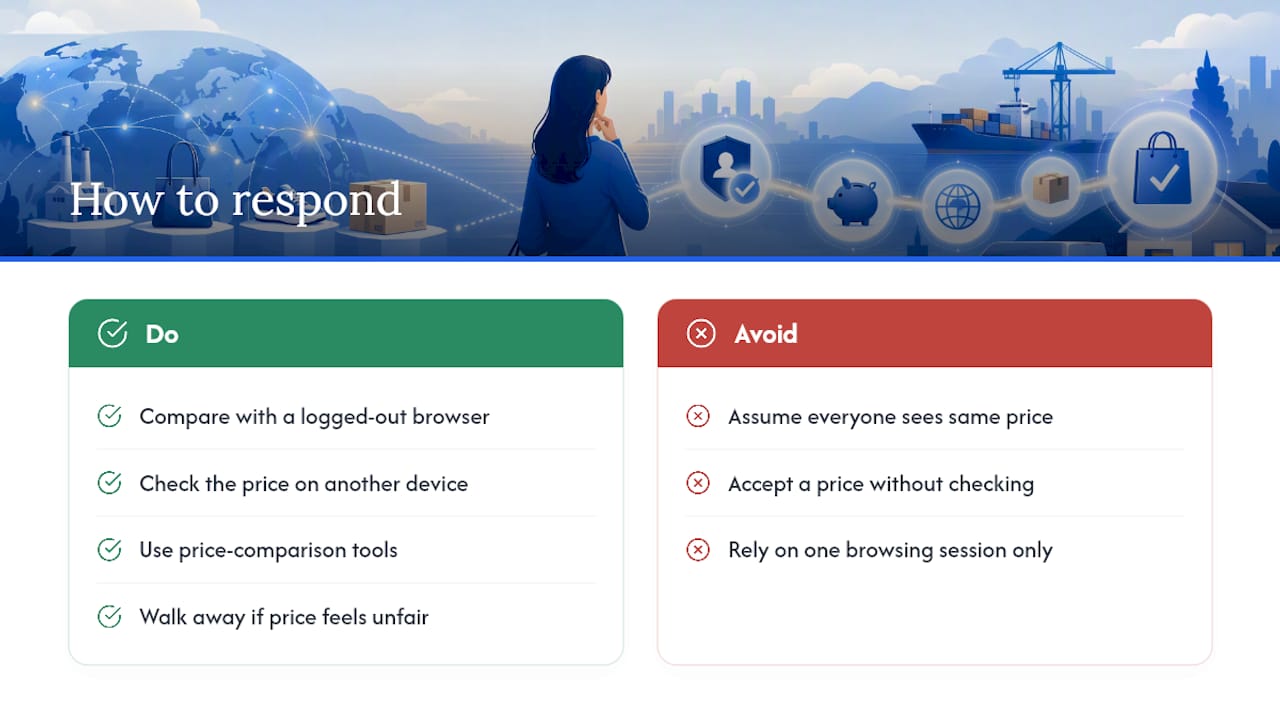
The practical response isn’t outrage, it’s verification. If you suspect you’re seeing a personalized price, the fastest way to confirm it is comparing what a logged-out browser or a different device shows for the same item.
How Price Swings Change the Way You Shop
Knowing that prices move constantly changes shopper behavior in a measurable way. Consumer research shows 76% of shoppers say they’ll change their habits to land a better deal, whether that means switching retailers, waiting for a sale window, or hunting for a promo code before checking out.
That shift shows up in three common patterns. First, cart abandonment climbs when shoppers sense a price might drop soon, they add the item, then wait instead of buying immediately. Second, comparison shopping before any purchase over roughly $50 has become close to automatic for price-conscious buyers, turning a single click into a five-tab research session. Third, trust erodes fast once a shopper catches a price rising right before a sale, or notices a “was $80, now $60” tag on an item that was never actually $80.
The upside is that this awareness works in the shopper’s favor. Once you know prices aren’t fixed, waiting becomes a legitimate strategy instead of a guess, and tools built around price history turn that waiting into a calculated decision rather than a hope.
How to Spot Dynamic Pricing While You’re Shopping
Catching dynamic pricing in the moment takes a bit of detective work, but a few methods make it visible fast. Open the same product page in an incognito or private browser window, then compare it against your regular logged-in session. A price difference between the two is a strong signal that personalization, not just general demand, is shaping what you see.
Switching devices tells you something too. Load the identical product on your phone, then on a laptop, then on a friend’s device if you can. Retailers sometimes price mobile traffic differently, assuming less price comparison happens on a smaller screen.
Price-history trackers double as detection tools here. If a tracked item shows a chart with frequent small jumps rather than occasional sales, that pattern points to algorithmic repricing rather than manual seasonal markdowns. A tool like AI Price Search that pulls from multiple verified retailers at once makes this comparison instant instead of requiring five separate browser tabs.
Timing your checks matters as well. Refresh a product page at different times of day, morning, midday, evening, over a few days. Consistent identical pricing suggests a stable rate; noticeable swings tied to time of day often point to demand-based repricing systems at work.
What Dynamic Pricing Actually Costs You as a Shopper
Even with good tools, dynamic pricing carries real limitations worth knowing before you rely on any single system. Alerts and trackers are only as accurate as the data feeding them, and a tool that misreads a bundle deal or a regional price variant can send you chasing a discount that never really existed.
Speed is another limit. Some price changes happen and reverse within hours, faster than most consumer tools refresh, which means you can miss a genuine drop entirely just by checking at the wrong moment. Retailers running aggressive competitor-based repricing can shift a price several times before your tracker’s next scheduled check.
There’s also a psychological risk. Constant awareness of price swings can push shoppers toward compulsive checking or decision paralysis, waiting endlessly for a “better” price that may never arrive while the item goes out of stock. And personalized pricing, by its nature, is hard to prove definitively from the outside, so you’re often working with strong circumstantial evidence rather than certainty.
The honest takeaway: no tool eliminates dynamic pricing’s unpredictability entirely. What good tracking does is shrink the gap between what a retailer’s system knows and what you know, tilting more decisions back in your favor even when it can’t catch every single fluctuation.
Author Perspective: One Alert, One Real Save
Last fall I watched a set of wireless headphones for three weeks before setting a $79 hard alert. The tracker fired on a Tuesday morning; I checked the seller’s reviews, confirmed a real US warehouse, and bought within the hour. Final saving versus the list price I’d first seen: $34. That’s the entire method: watch history, set a real threshold, verify before you click. It works because it removes the guessing, not because it’s clever.
— Timothy
Let AI Price Search Do the Watching for You
Everything in this guide, tracking price history, setting real alert thresholds, checking seller reliability, catching dropship markups, works better when one tool handles all of it instead of five browser tabs. AI Price Search pulls live prices from verified US retailers and factory-direct sources, flags sellers with weak reliability signals, and includes image search so you can snap a photo of anything and find it cheaper elsewhere.
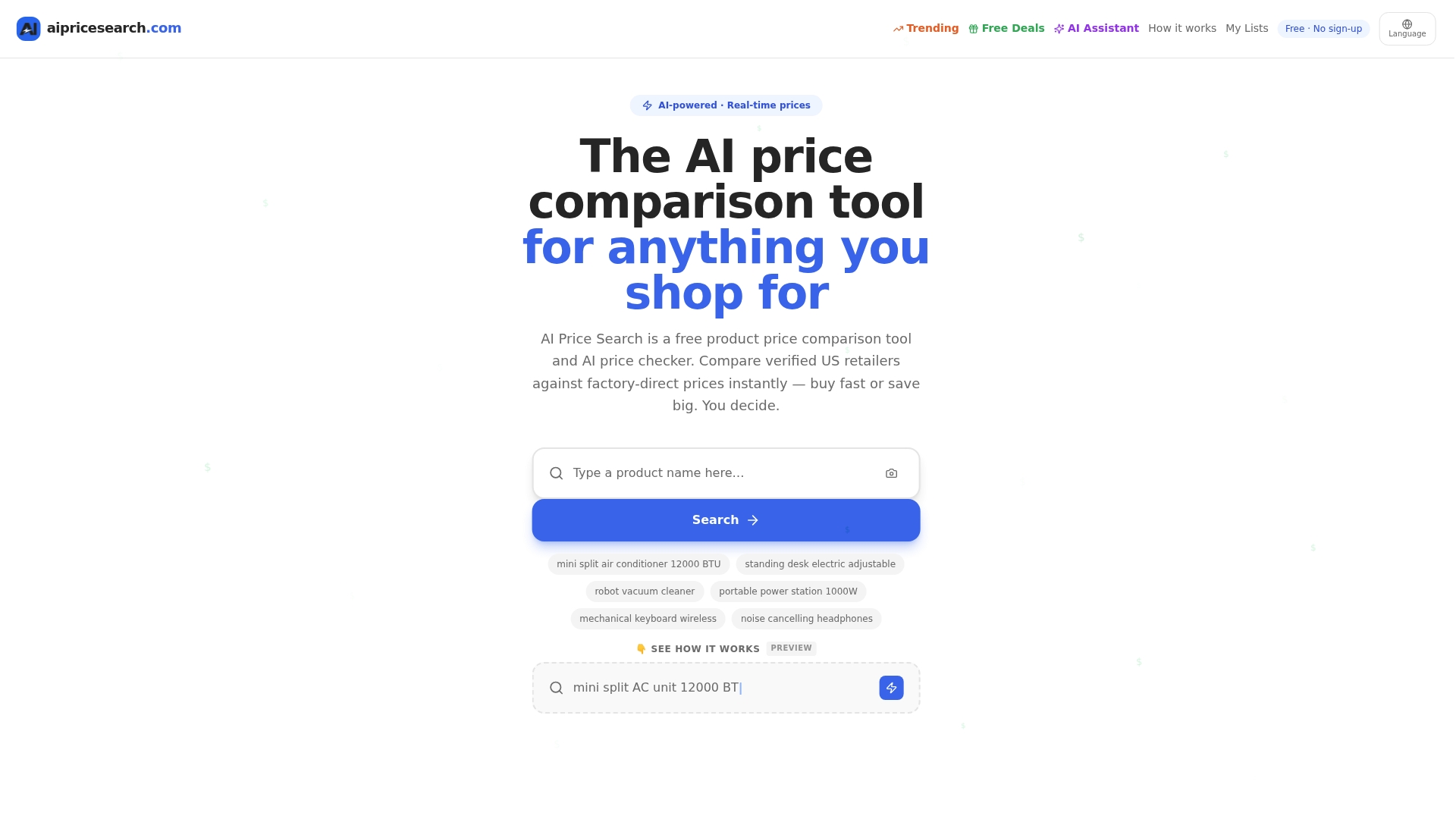
Shoppers using the platform reported average savings of $212 this month, largely from catching landed-cost differences that a simple price comparison would have missed. The tool is free to use, runs on an affiliate model, and doesn’t require handing over payment details just to start comparing. If you’re deciding between AI Price Search and a general aggregator, the comparison against Google Shopping breaks down exactly where the seller-reliability checks add value that a plain price list doesn’t. Search your next purchase before you buy it, not after.
Sources
- Best deals and online shopping tips | NerdWallet
- How to get the best prices on everything every time you shop | U.S. News & World Report
- Ecommerce Price Monitoring: A Complete 2026 Guide | WebScrapingHQ
Recommended
- Yahoo Shopping Comparison
- Amazon Vs Walmart Price Leadership Across 182 Weekly Searches
- Retailer Price Wars Aliexpress And Amazon Split The Lead In 184 Consumer Searches
Want to compare offers instantly? Search any product on AI Price Search.
Search a price →