Budget Shoppers: Compare Prices With Shipping Using a Short Worksheet

The cheapest listing on your screen is rarely the cheapest thing you’ll actually pay for. To compare prices with shipping correctly, add up item price, shipping, tax, mandatory fees, and expected return cost for each option, then rank by that total. Aipricesearch runs this math automatically, but the same formula works on a notepad if you’d rather do it by hand.
TL;DR:
- Shipping and tax often significantly affect the total cost, making a cheaper-listed item more expensive after all charges are included.
- Always verify the exact SKU or model, open checkout pages, and note all associated fees and conditions before comparing prices.
- Automated tools like Aipricesearch can save time by calculating and ranking offers based on the true landed cost across multiple retailers.
- Comparing totals with a spreadsheet or calculator ensures you account for discounts, fees, and potential return costs, reducing mistakes.
- Set small price or return-policy thresholds when totals are close, prioritizing speed, reliability, or better coverage over minimal savings.
Table of Contents
- Quick Checklist: What to Open and Note Before You Compare Offers
- Step-by-Step: Calculate the Total Landed Cost
- Common Gotchas: Shipping, Tax, and Fees That Change the Bottom Line
- Tools and Workflows That Speed Comparisons
- Quick Worksheet: The Simplest Spreadsheet or Calculator Fields to Use
- How to Choose When Totals Are Close: Balancing Price, Speed, and Risk
- Author Perspective: A Quick Shopping Habit Worth Stealing
- Try Aipricesearch to Compare Total Prices Including Shipping
- Sources
Quick Checklist: What to Open and Note Before You Compare Offers
Before ranking anything, pull the same information from every listing you’re considering. Mismatched data is the number one reason shoppers pick the wrong “winner.”
Start by opening every listing for the exact SKU or model, not a similar one. If a retailer lets you get close to checkout without creating an account, do it. That’s where shipping and tax actually show up, and the FTC recommends confirming total cost and reading the deal’s fine print before you commit.
For each listing, jot down:
- Item price before and after any coupon
- Shipping cost and estimated delivery window
- Estimated tax (or a note that it’s unknown until checkout)
- Any mandatory fees, like a “handling” or “processing” charge
- Return window and whether return shipping is free
- Condition, bundled accessories, and warranty terms
Normalize these before you rank anything. A “$14 cheaper” listing that ships in ten business days without the charger everyone else includes isn’t actually cheaper.
Step-by-Step: Calculate the Total Landed Cost
The formula behind every good price comparison is straightforward:
Total landed cost = item price − confirmed discounts + shipping + tax + mandatory fees + expected return cost − reliable cashback
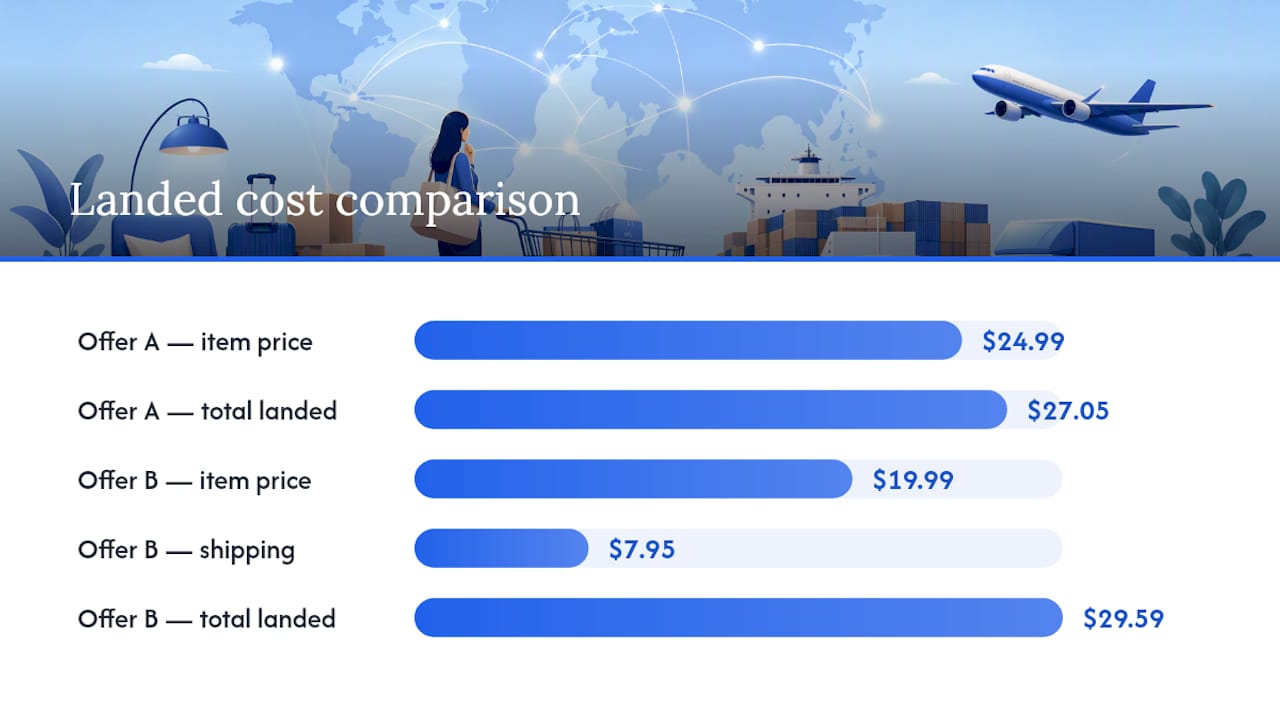
Here’s how it plays out with two real offers for the same wireless charger:
- Offer A: $24.99 item price, free shipping, $2.06 estimated tax, no fees. Total: $27.05.
- Offer B: $19.99 item price (looks cheaper at first glance), $7.95 shipping, $1.65 tax. Total: $29.59.
Offer A wins by $2.54 despite having the higher sticker price. This flip happens constantly with electronics, home goods, and anything under $30, where shipping eats a bigger share of the total.
To find each input: item price and shipping usually show at the cart page. Tax is trickier, since the taxability of shipping charges varies by state and by whether the retailer bundles shipping into the taxable total or lists it separately. If you can’t reach checkout without an account, estimate tax using your local sales tax rate on the item price alone, then flag it as an estimate. For return cost, use $0 if the item has free returns and you’re confident you’ll keep it, or add a few dollars as a buffer if the category (clothing, shoes) has a higher-than-average return rate. This framework mirrors the total-cost method that consumer advocates recommend for exactly this reason.
Common Gotchas: Shipping, Tax, and Fees That Change the Bottom Line
Free shipping thresholds are the most common trap. A retailer offering free shipping over $35 can push you to add a second item you didn’t need, which defeats the purpose of comparing cheap options in the first place. Watch for this especially on marketplaces with a low per-item price and a high per-order shipping floor.
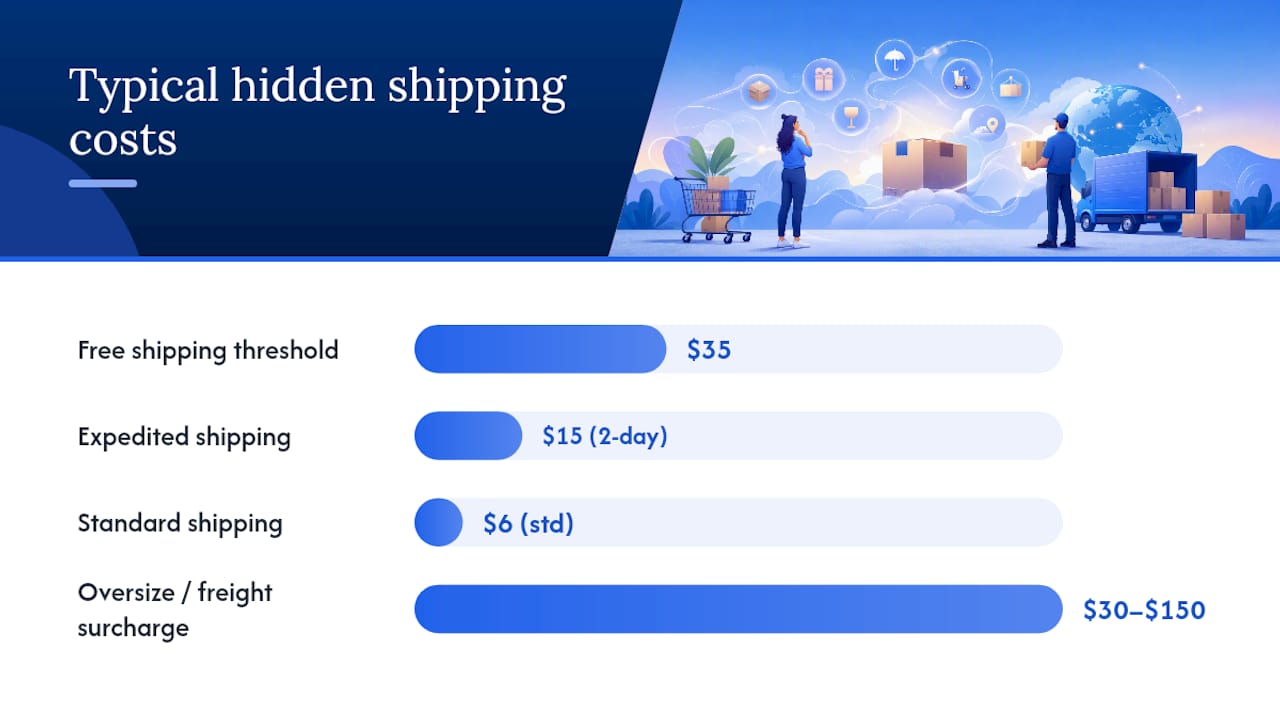
Oversize and freight surcharges hit furniture, appliances, and anything over a certain weight class, sometimes adding $30 to $150 that never shows up until the final checkout screen. Expedited shipping options also distort comparisons: a $5 cheaper item with $15 two-day shipping can lose to a $10 pricier item with $6 standard shipping if you’re not in a rush.
Tax adds another layer of unpredictability. Because shipping tax treatment differs from state to state, the same item can carry different total tax depending on whether the seller itemizes shipping separately. Some jurisdictions now push retailers toward all-in advertised pricing, but government taxes and certain shipping charges are often still excluded from that upfront number, so checkout is still where you confirm the real total.
- Membership-only pricing that looks like a discount but requires a paid subscription
- Coupon codes that expire or exclude the exact item you want
- Mandatory “eco fees” or “processing fees” added at the final step
- Restocking fees that quietly erase a return’s value
Pro Tip: Keep a running note of your state’s shipping tax rule once you find it. Most states don’t change this often, so you’ll only need to look it up once per state you order from.
Tools and Workflows That Speed Comparisons
Doing this math by hand works fine for a single purchase. It gets tedious fast once you’re comparing five listings for a laptop or tracking a price over three weeks waiting for a sale.
For occasional shoppers, a basic spreadsheet template or a simple compare-price calculator that sums price, tax, and shipping while subtracting discounts covers most cases. Browser tabs open to each retailer’s checkout page work too, if you’re patient enough to click through each one.
For anyone comparing prices regularly or tracking an item over time, an automated tool makes more sense. Aipricesearch pulls total price including shipping and tax across verified US retailers and factory-direct marketplaces, then ranks offers by real landed cost instead of sticker price. Its Dropship Detector flags listings where a seller is marking up a factory-direct product, which matters when a suspiciously low price turns out to route through a middleman. Aipricesearch also supports image search for finding a product without knowing its exact name, and price-tracking alerts for items you’re willing to wait on. Users report notable average savings this month using the tool.
- Use a spreadsheet for a single, one-off purchase decision
- Use price alerts when you’re not in a rush and want to catch a drop
- Use an automated comparison tool when checking five or more listings or tracking multiple items at once
Quick Worksheet: The Simplest Spreadsheet or Calculator Fields to Use
A working comparison sheet only needs nine columns: Marketplace, Seller, Item Price, Shipping, Tax, Fees, Discount, Expected Return Cost, Net Total.
- Fill in one row per listing using numbers pulled straight from checkout, not the product page, since checkout is where shipping and tax actually confirm.
- If you’re comparing different pack sizes or quantities, add a “unit price” column and divide net total by quantity so a 12-pack isn’t compared against a 6-pack directly.
- Let the sheet calculate net total automatically with a simple sum formula, then sort by that column, lowest to highest.
If a full spreadsheet feels like overkill, a basic calculator works for two or three offers: add item price, tax, and shipping, then subtract any confirmed discount for each option and compare the results side by side. This mirrors the worksheet approach that consistently produces fewer mistakes than eyeballing sticker prices across open tabs.
How to Choose When Totals Are Close: Balancing Price, Speed, and Risk
When two totals land within a few dollars of each other, price stops being the deciding factor. Give yourself small, deliberate tolerances instead of defaulting to the absolute lowest number.
- Pay up to $5 more for meaningfully faster shipping if you actually need the item soon
- Pay $10 to $20 more for stronger return coverage on anything over $100, especially electronics
- Favor a seller with a stronger reliability track record for fragile or hard-to-replace items, even at a modest premium
- Check for price-match or price-protection policies before buying, since they reduce the sting of a post-purchase price drop
Pro Tip: A $12 premium for guaranteed 30-day returns is cheap insurance on anything you can’t easily test before opening the box.
Author Perspective: A Quick Shopping Habit Worth Stealing
I check the checkout total before I check the price tag. That’s the whole habit. Every purchase over $30 gets a four-field note: price, shipping, tax, return terms. It takes fifteen seconds and it has saved me from picking the “cheaper” option more times than I can count.
The pattern that surprised me most researching this: shoppers get fixated on the item price and treat shipping and tax as afterthoughts, when they’re often the actual deciding factor. Aipricesearch’s reported average savings of $212 per user this month lines up with what the math above predicts. Save the worksheet, set a price alert on anything you’re not buying today, and let the totals do the deciding instead of the sticker.
— Timothy
Try Aipricesearch to Compare Total Prices Including Shipping
Aipricesearch does the total landed cost math for you the moment you search, pulling item price, shipping, and tax across verified US retailers and factory-direct marketplaces instead of leaving you to reconstruct it checkout by checkout.

Beyond the total price, Aipricesearch flags seller risk with its Dropship Detector, so a suspiciously cheap listing gets checked before you click through. You can also set price-tracking alerts for anything you’re willing to wait on, and use image search when you know what a product looks like but not what it’s called. Users report average savings of $212 this month, which tracks with how much shipping and tax swings a “final” total once you account for them properly.
If you’re ready to see your next purchase ranked by real cost instead of sticker price, start a search on Aipricesearch and compare the totals yourself before you check out anywhere else.
Sources
- Consumer Advice: Online Shopping
- New all-in pricing rules: how small businesses must show prices and fees in 2026
- Do you pay sales tax on shipping?
- Compare Total Cost Online: Price, Shipping, Tax, Fees
Recommended
- Yahoo Shopping Comparison
- Google Shopping Comparison
- AIShopping Assistant
- AI Price Search Vs Pricegrabber
Created with BabyLoveGrowth AI
Want to compare offers instantly? Search any product on AI Price Search.
Search a price →